Recovering webmentions from the Fediverse after migrating to Cloudflare
- Published on
- · 6 min read
- Author
-
-

- Name
- Jen Chan
-
This is a long procrastinated post on debugging the phenomena of missing webmentions ever since I migrated this blog from Vercel to Cloudflare pages. I’ve since “upgraded” this NextJS setup to a Cloudflare Worker.
TL;DR: This is how I got these showing up again under my posts 👇🏻

The approach:
- webmention.io for receiving webmentions
- Brid.gy for sending backfeed from the Fediverse
- A NextJS server function that fetches webmentions from webmention.io at build time and stores them in Cloudflare’s R2 cache (See
app/lib/getWebMentionsPerPost.ts) - NextJS static bundle is deployed by a Cloudflare Worker
Why webmentions?
The main idea behind the IndieWeb and Fediverse is to provide nerds with the opportunity to own their own content and reduce reliance on centralized platforms – many of which have had all value extracted, and do little to facilitate socialization and connection.
Webmentions offer a way to link your identity and contributions to your own domain (if you wanted to). Setup is easy if you have a static site. All you have to do is include some <link> tags and update your social media with your domain.
So far, there are 2 main ways to enable webmentions:
- webmention.io is a service that started by the person who wrote a lot of the original mechanics behind IndieAuth, and was what I used as an external API for webmentions.
Then by embedding a <link> tag in your HTML, you can tell webmentions.io to send webmentions to your domain when someone either mentions you on the Fediverse or literally sends a webmention to your domain. (Mastodon and Github also supports this.)
<link
  rel="webmention"
  href="https://webmention.io/<your-domain.com>/webmention"
/>
To start the journey of owning your own content, check out IndieWebify.Me
- You could roll your own webmentions service by creating your own webmentions endpoint and posting to it with microformats2 data included. Within your site’s view markup, you would also benefit from adding microformats2 data to your posts. This would be more effortful than using the existing services.
This post addresses webmentions that go missing despite doing option #1.
Bridging your domain to the Fediverse
To further embed your content with the Fediverse and connect it with your domain-as-identity, Bridgy Classic (brid.gy) could be used to share posts from your site to Mastodon or Bluesky and to connect “backfeed” (reactions, reposts, and comments) back to the content on your domain.
Alternately, Bridgy Fed (fed.bri.gy) could be used to “bridge” posts from your website or an existing Fediverse account onto a different network’s account.
Bridging !== Cross-posting
It’s worth figuring out whether you want to use Bridgy Classic or Bridgy Fed. One is not like the other, and entirely easy to mix up.
If you already have BOTH accounts, there’s no point in using Bridgy Fed.
If you already have either a Bluesky or Mastodon account, you can link your domain to your existing Fediverse accounts, so that you’re recognized as the author of the content on the platform. For example, Bridgy Fed can bridge posts from your existing Mastodon account to a brand new Bluesky account.
In either case, I’ve found you can’t expect to cross-post between two existing Fediverse accounts using this service.
Setting up Bridgy Classic with Bluesky
To be able to relate my domain and existing BlueSky account to bridgy, I did the following:
- create an app password so
brid.gyorfed.bri.gycan syndicate posts on your behalf. Afterwards, I copied thedldvalue and added it to my domain registrar.
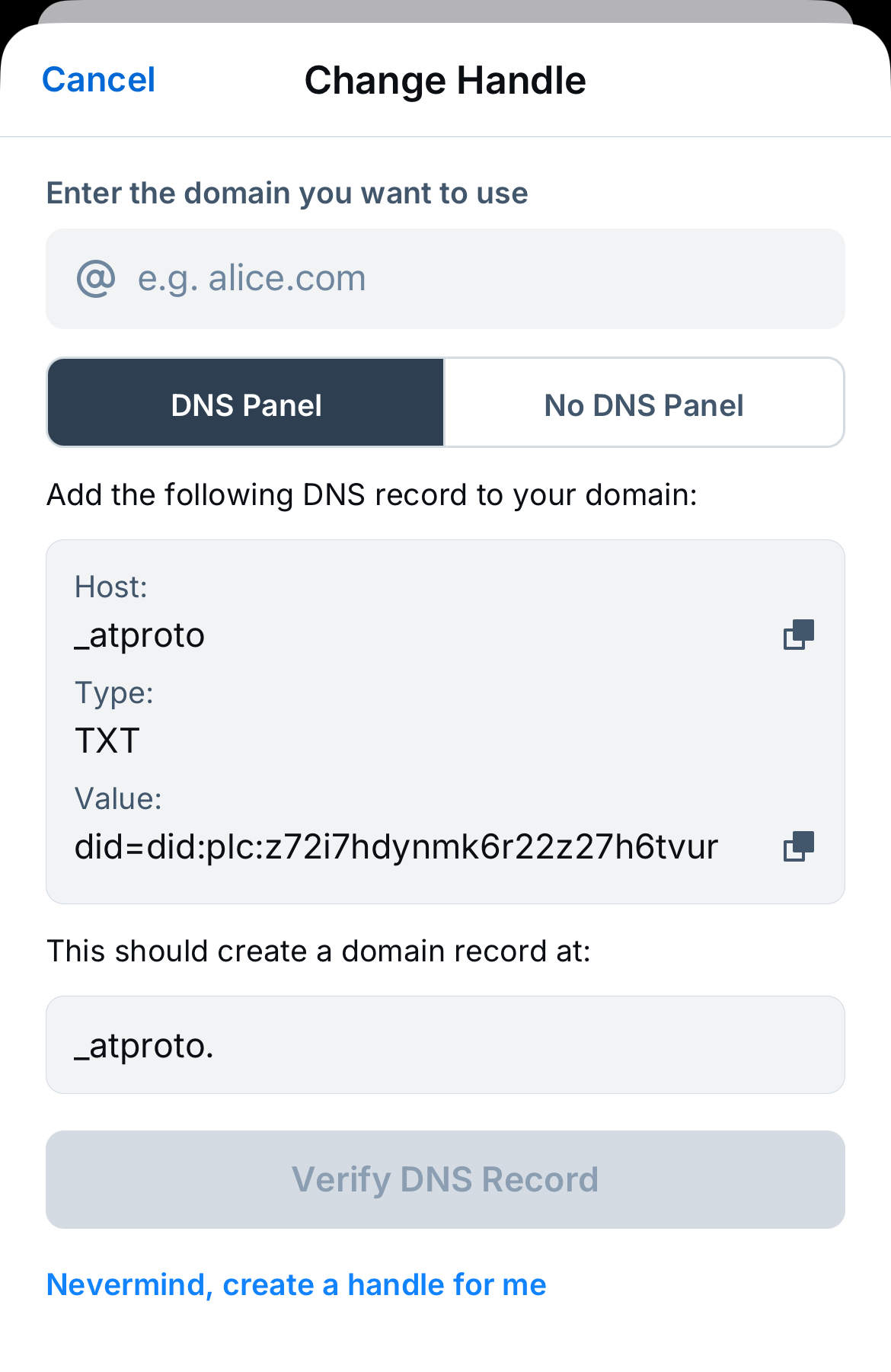
Source: Bluesky’s guide to setting up a domain handle.
- Update Cloudflare DNS settings with a
TXTrecord

Using my domain as handle on Bluesky
Bluesky’s ATProtocol offers a few ways to update your account handle to be the same as your domain.
The HTTPS Well-known Method
Totally extra: to be able to have fed.brid.gy recognize my existing Mastodon and BlueSky accounts as connected to my domain without creating new bridged accounts on the network, I also included these webfinger redirects in my _redirects file:
/.well-known/atproto-did https://fed.brid.gy/.well-known/atproto-did 301
/.well-known/host-meta https://fed.brid.gy/.well-known/host-meta 301
/.well-known/webfinger https://fed.brid.gy/.well-known/webfinger 301
The DNS TXT Record Method
This is also the approach recommended by ATProtocol docs.
On my BlueSky account, I created an application password specifically for bridging and copied the dld value, and updated my DNS settings with a txt record.
Since I already had existing Mastodon and Bluesky accounts, this use of fed.brid.gy is actually quite redundant as I’m not looking to create a bridged account of my website’s posts on a federated network, nor am I looking to create a bridged account of one Fediverse account’s posts to another.
The only benefit here is that when I log into fed.brid.gy with Mastodon or Bluesky, it won’t create an alternate bridged account on the network, and will instead recognize my existing accounts.
Getting around this mess
As you can tell, I went through all 3 services’ docs blow by blow to see what might unblock the sending of webmentions and display of backfeed. Prior to moving my deployment to Cloudflare, webmentions.io had always worked.
AI was useless at debugging this… as it is with all kinds of fringe tech.
After rummaging through Google, I found a 2019 post by Chris McLeod who found that Cloudflare was blocking Bridgy’s webmentions.
I had a hunch that Cloudflare’s scrape shield or AI Audit features (now renamed “AI Crawl Control”) was blocking forwarded webmentions from Bridgy.
Reading the W3C spec, I noticed that the second criteria for sending webmentions is that the request must include a link header in HTTP requests to discover the webmention endpoint. (See 3.1.2 Sender discovers receiver Webmention endpoint)
So I applied a custom Cloudflare transform rule rule. (It probably could also be a _headers rule.)

Ta-da! 🎉 Webmentions are back.

Now, when I log into brid.gy with Bluesky or Mastodon, I can use Bridgy to share new posts from my site, have community reactions linked to my posts, and even resend webmentions from older posts on the Fediverse.

Now for a vanity embed!
Adding to the internet’s dogpile of webmention troubleshooting for collecting authentic reactions from online communities. (https://jenchan.biz/blog/recovering-webmentions-after-migrating-to-cloudflare)
[image or embed]
— 422 Unprocessable Entity (
@jenchan.biz
)
September 23, 2025 at 5:57 PM